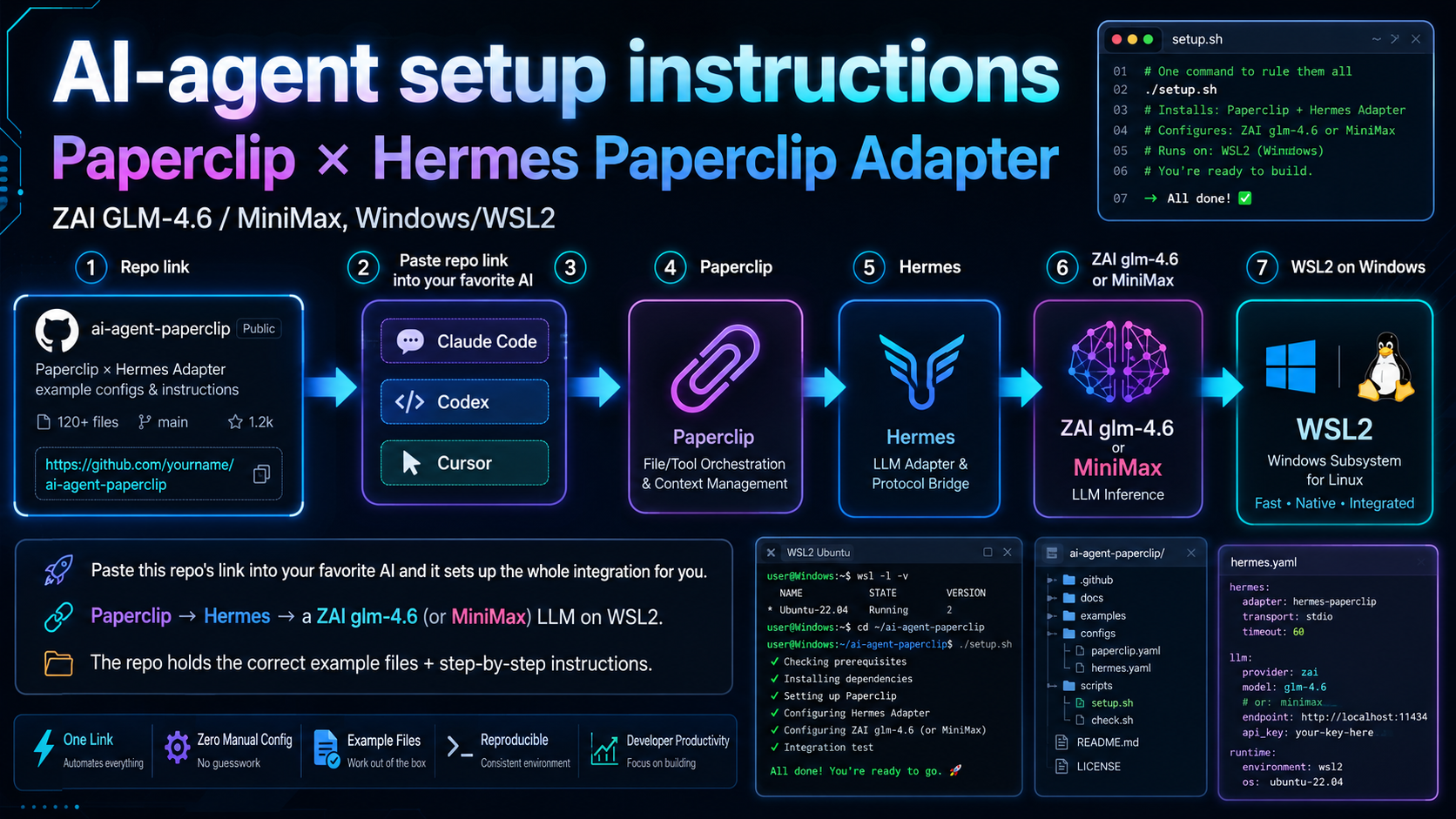
Paperclip × Hermes Paperclip Adapter integration — run Paperclip agents on a ZAI GLM-4.6 (or MiniMax) LLM, on Windows + WSL2
Paste the repo link into your AI agent — it wires up the whole chain for you.
repo: paperclip-hermes-paperclip-adapter-integration-glm-4.6-zai-minimax-llm-windows-wsl2Paperclip orchestrates AI agents; each agent needs an LLM backend. This bridges Paperclip (Windows) → Hermes Paperclip Adapter (WSL2) → a ZAI glm-4.6 or MiniMax model — and documents the sharp edges that silently break it.
Point your AI coding agent at the repo — it follows the instructions and glue files.
The repo carries the correct example files and the step-by-step instructions an AI agent follows to build the whole chain. One step — installing Hermes itself — is interactive and flagged for a human; the rest the AI does for you.
Paperclip (Node.js, Windows, port 3100)
    │  resolveSpawnTarget → calls the entry point directly
    ▼
hermes.cmd            # main entry point Paperclip invokes
    │  python "%~dp0launch_hermes.py" %*
    ▼
launch_hermes.py      # the bridge — all the logic
    │  pins the model · writes the prompt to a file (quote-safe) · runs hermes
    ▼
WSL2 Ubuntu — hermes chat   # ~/.hermes/config.yaml + .env
    ▼
ZAI glm-4.6  # — or a MiniMax model, provider-agnostic
The two sharp edges it solves for you
- Quote-safe prompt passing. Paperclip prompts contain
"; passing them throughwsl python3 -c "…"makes bash choke. The bridge writes the prompt to a file over a stdin pipe, so quoting can never break the call. - Mirrored networking. WSL2's own network stack can't reach
127.0.0.1:3100. A tiny.wslconfigswitches WSL to mirrored mode so the agent can call back into Paperclip.
Good to know
- Runs against your own LLM key — you bring a ZAI (or MiniMax) API key.
- Windows-only host (Paperclip); the agent side lives in WSL2 Ubuntu.
- Everything runs locally on your machine — no third-party proxy in the middle.
- Prefer manual? A full by-hand guide ships in
external_files/.
Glue files that make a fiddly integration repeatable.
Each file exists to remove one sharp edge from the Paperclip → Hermes → LLM chain.
The bridge
launch_hermes.py reads the Paperclip task, writes the prompt to a WSL file (quote-safe), and runs hermes.
Windows entry point
hermes.cmd is what Paperclip calls; it delegates to the bridge sitting beside it.
One-command installer
install_hermes_wsl.ps1 installs hermes-agent in WSL, writes the config + key, adds a PATH shim, and verifies.
Provider-agnostic
Default is ZAI glm-4.6; switch to MiniMax or any backend via the HERMES_MODEL env var, per run.
Build a single .exe
hermes.spec builds dist\hermes.exe with PyInstaller, so Paperclip can call a compiled binary.
Troubleshooting built in
The README documents the WSL quoting bug, the networking fix and the hermesCommand Paperclip quirk — with the exact fixes.
Two ways: let your AI do it, or run the installer.
The repo has everything either path needs.
Let your AI agent do it recommended
Paste the repo's link into Claude Code / Codex / Cursor and say "set up this Paperclip × Hermes integration." It follows the instructions and example files to bring the whole chain up.
Or by hand — three steps
- Get a ZAI API key — sign in at z.ai/manage-apikey, create a key, copy it.
- Run the installer — in PowerShell from the repo folder:
.\install_hermes_wsl.ps1. It sets up hermes-agent, the config (zai/glm-4.6) and your key in WSL. - Point a Paperclip agent at the bridge — set Hermes Command to the full path of
hermes.cmd, addZAI_API_KEY, click Test Environment →Passed. Assign a task and it runs on GLM-4.6.
Requirements: Windows 10/11 with WSL2 (Ubuntu), Node.js 20+, Python 3.10+ on Windows and in WSL, and a z.ai API key.
Drive Paperclip agents on GLM-4.6 — without the yak-shaving.
Open source (MIT). The repo documents and automates the working setup so you don't have to rediscover the sharp edges.